Loic.liangxiegame.QFramework
1.0.0
dotnet add package Loic.liangxiegame.QFramework --version 1.0.0
NuGet\Install-Package Loic.liangxiegame.QFramework -Version 1.0.0
<PackageReference Include="Loic.liangxiegame.QFramework" Version="1.0.0" />
<PackageVersion Include="Loic.liangxiegame.QFramework" Version="1.0.0" />
<PackageReference Include="Loic.liangxiegame.QFramework" />
paket add Loic.liangxiegame.QFramework --version 1.0.0
#r "nuget: Loic.liangxiegame.QFramework, 1.0.0"
#:package Loic.liangxiegame.QFramework@1.0.0
#addin nuget:?package=Loic.liangxiegame.QFramework&version=1.0.0
#tool nuget:?package=Loic.liangxiegame.QFramework&version=1.0.0



QFramework 简介 Intro
QFramework 是一套 渐进式 的 快速开发 框架。目标是作为无框架经验的公司、独立开发者、以及 Unity3D 初学者们的 第一套框架。框架内部积累了多个项目的在各个技术方向的解决方案。学习成本低,接入成本低,重构成本低,二次开发成本低,文档内容丰富(提供使用方式以及原理、开发文档)、插件丰富。github:https://github.com/liangxiegame/QFramework
QFramework is a Progressive and RAD framework.Goal is become indie developer and fresh man's The First Framework。It's include many project's tech solution.Easy 2 Learn,Easy 2 Install,Easy 2 Refactor,Easy 2 Modify,Feature Packed documents and plugins. github:https://github.com/liangxiegame/QFramework
码云国内镜像仓:https://gitee.com/liangxiegame/QFramework
ShowCase(商业案例)
| 鬼山之下 | 谐音梗挑战 |
|---|---|
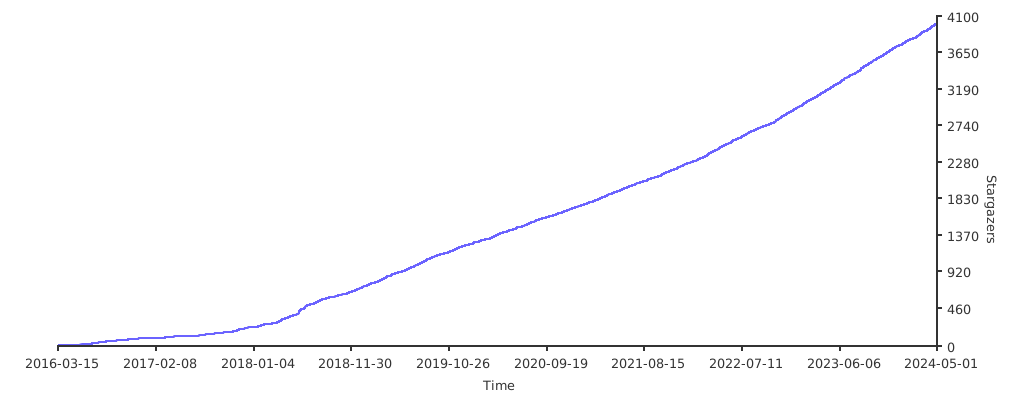
Star 趋势(如果项目有帮到您欢迎点赞)
快速图解:
1.ViewController和Bind的基本使用 自动生成脚本
自动生成的脚本如下:
2.ViewController和ViewController的嵌套使用
自动生成的脚本如下:
3.自动生成Prefab
4.使用UIKit创建Prefab和脚本
自动生成的脚本如下:
5.使用UIKit子控件UIElement
快速开始 QuickStart:
1.Action Kit
- chainning style(Driven by MonoBehaviour or Update)
this.Sequence()
	.Delay(1.0f)
	.Event(()=>Log.I("Delayed 1 second"))
	.Until(()=>something is done)
	.Begin();
- object oriented style
var sequenceNode = new SequenceNode();
sequenceNode.Append(DelayAction.Allocate(1.0f));
sequenceNode.Append(EventAction.Allocate(()=>Log.I("Delayed 1 second"));
sequenceNode.Append(UntilAction.Allocate(()=>something is true));

this.ExecuteNode(sequenceNode);
2.Res Kit
// allocate a loader when initialize a panel or a monobehavour
var loader = ResLoader.Allocate();

// load someth in a panel or a monobehaviour
loader.LoadSync<GameObject>("resources://smobj");

loader.LoadSync<Texture2D>("resources://Bg");

// load by asset bundle's assetName
loader.LoadSync<Texture2D>("HomeBg");

// load by asset bundle name and assetName
loader.LoadSync<Texture2D>("home","HomeBg");


// resycle this panel/monobehaivour's loaded res when destroyed
loader.Recycle2Cache();
loader = null;
3.UI Kit
// open a panel from assetBundle
UIKit.OpenPanel<UIMainPanel>();

// load a panel from specified Resources
UIKit.OpenPanel<UIMainPanel>(prefabName:"Resources/UIMainPanel");

// load a panel from specield assetName
UIKit.OpenPanel<UIMainPanel>(prefabName:"UIMainPanel1");
技术支持 Tech Support:
- 文档 Document:http://qf.liangxiegame.com/qf/community
- 如在使用中遇到问题请提交 这里 issue,我们团队会在一天内快速回复并着手解决。
- **QQ 群:623597263 **:在 QQ 群内提问,会马航内得到回复。
- 社区:https://liangxiegame.com/qf/intro/
- awesome_qframework
下载地址 Download:
- 最新版本:https://github.com/liangxiegame/QFramework/releases
- Asset Store
赞助 Donate:
- 如果觉得不错可以在 这里 Asset Store 给个 5 星哦~ give 5 star
- 或者给此仓库一个小小的 Star~ star this repository
- 以上这些都会转化成我们的动力,提供更好的技术服务!
运行环境
- Unity 5.6.x ~ 2020.x
可选的包含项目 Include Projects:
参考 Reference:
- MultyFramework
- IFramework_GUICanvas
- IFramework
- Loxodon Framework
- BDFramework
- HGFramework: Unity3D客户端框架
- Qarth: Framework For Game Develop With Unity3d
- GameFramework:A game framework based on Unity 5.3 and later versions
- cocos2d/cocos2d-x
- ResetCore.Unity
- UnityUGUIImageShaderPack
- FishManShaderTutorial
贡献者/感谢 Developer/Contributor:
优秀的 Unity 库、框架
- ET:ET Unity3D Client And C# Server Framework
- xasset: xasset 致力于为 Unity 项目提供一套精简稳健的资源管理环境
- TinaX: 开箱即用的 Unity 开发框架,支持 Lua。
- IFramework(OnClick) Simple Unity Tools
- JEngine JEngine is a streamlined and easy-to-use framework designed for Unity Programmers.
代码规范完全遵循:
| Product | Versions Compatible and additional computed target framework versions. |
|---|---|
| .NET | net5.0 is compatible. net5.0-windows was computed. net6.0 was computed. net6.0-android was computed. net6.0-ios was computed. net6.0-maccatalyst was computed. net6.0-macos was computed. net6.0-tvos was computed. net6.0-windows was computed. net7.0 was computed. net7.0-android was computed. net7.0-ios was computed. net7.0-maccatalyst was computed. net7.0-macos was computed. net7.0-tvos was computed. net7.0-windows was computed. net8.0 was computed. net8.0-android was computed. net8.0-browser was computed. net8.0-ios was computed. net8.0-maccatalyst was computed. net8.0-macos was computed. net8.0-tvos was computed. net8.0-windows was computed. net9.0 was computed. net9.0-android was computed. net9.0-browser was computed. net9.0-ios was computed. net9.0-maccatalyst was computed. net9.0-macos was computed. net9.0-tvos was computed. net9.0-windows was computed. net10.0 was computed. net10.0-android was computed. net10.0-browser was computed. net10.0-ios was computed. net10.0-maccatalyst was computed. net10.0-macos was computed. net10.0-tvos was computed. net10.0-windows was computed. |
-
net5.0
- No dependencies.
NuGet packages
This package is not used by any NuGet packages.
GitHub repositories
This package is not used by any popular GitHub repositories.
| Version | Downloads | Last Updated |
|---|---|---|
| 1.0.0 | 1 | 7/31/2021 |